

Ready to dive into the world of online shopping? A physical store is no longer enough. Customers are online, credit cards ready. The question is: how do you create an ecommerce website that actually sells? It’s about building a sales powerhouse.
This guide simplifies the process, even for those with zero experience. We’ll cover platform selection to search engine optimization. By the end, you’ll understand how to build an ecommerce website that attracts and converts customers.
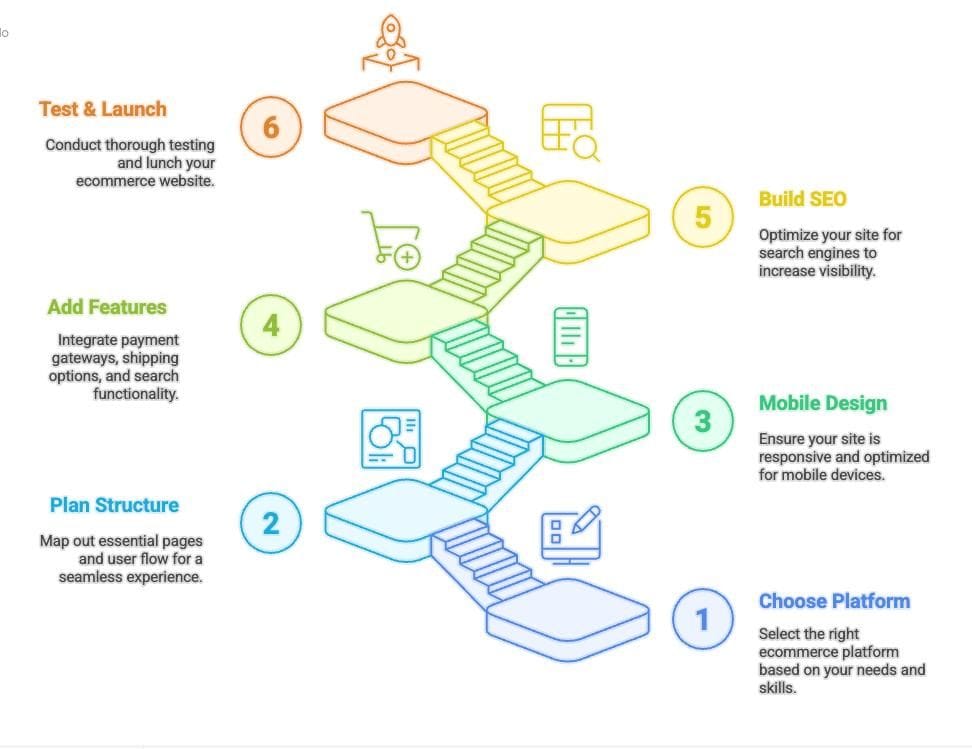
In This Guide, You’ll Discover:
- How a well-designed ecommerce site can revolutionize your business.
- The perfect ecommerce website builder for your specific needs.
- How to plan your store’s structure for a great user experience and repeat visits.
- Mobile-first design for today’s mobile-centric world.
- Essential features like payment gateways and streamlined shipping.
- A strong SEO foundation for better visibility.
- Testing and launching your store with confidence, making a great first impression.
Why Having an Ecommerce Website Matters Now More Than Ever
Online shopping isn’t a trend; it’s the new normal. Ecommerce growth has fundamentally changed how people buy. Modern customers want convenience, vast choices, and the ability to shop anytime, anywhere.
Think about it: How often do you browse online stores, even if you buy in person? A good ecommerce website puts your products in front of a large audience, 24/7. It’s the always-open storefront.
Boosting Sales and Reaching New Customers
A well-built ecommerce site significantly grows sales by:
- Expanding Your Reach: Go beyond local limits and connect with customers nationally or even globally. Imagine showcasing your handmade crafts to the world.
- Increasing Accessibility: Offer 24/7 service, across time zones, fitting into busy schedules. Be available whenever and wherever customers need you.
- Providing Detailed Product Information: Use great photos, videos, and descriptions. Answer customer questions before they ask. Transparency builds trust and drives sales.
- Simplifying the Purchase Process: Make browsing, selection, and payment easy with secure options. Minimize friction to boost sales.
Real-Life Success Stories
Consider Sarah, who makes handcrafted jewelry. After launching an ecommerce website, her sales jumped 300% in six months! John, a woodworker, also saw increased earnings and customer engagement. Customers loved his expertise and became loyal fans. These stories are becoming the norm, and you can achieve this too by learning how to create an ecommerce website.
Step 1: Choosing the Right Ecommerce Platform
Your platform is the foundation. Luckily, you have many choices. The best ecommerce website builder depends on your needs, tech skills, and budget.
👉 Want to launch a store without touching a line of code? Check out our step-by-step guide on how to make a no code online shop, using easy, beginner-friendly tools
Here’s a quick look at some popular options:
- Shopify: Known for its ease of use and built-in features. Often a good starting point for beginners.
- WooCommerce: A flexible platform designed for WordPress, ideal for those wanting more control and customization.
- Wix: A simple drag-and-drop interface with many templates, making it easy to get started.
- Webflow: Known for its advanced design options and SEO features, popular among businesses wanting a stunning online storefront.
When to Choose Each Platform
- Shopify: Choose Shopify for simplicity, all-in-one functionality, and great support. It’s for businesses that want to focus on sales, not technical details.
- WooCommerce: Choose WooCommerce if you already have a WordPress site or need advanced customization and integrations. It gives you full control.
- Wix: Choose Wix when you want quick setup and easy design. Its drag-and-drop interface makes website creation easy, even with no experience.
- Webflow: Think about Webflow when you need a visually stunning website and value design flexibility. Great for stores that prioritize design and SEO.
Quick Comparison: Shopify vs. WooCommerce vs. Wix vs. Webflow
| Feature | Shopify | WooCommerce | Wix | Webflow |
| Ease of Use | Very easy, beginner-friendly | Medium, needs WordPress knowledge | Drag-and-drop, very simple | Medium-hard, more learning required |
| Customization | Limited, extend with apps | Very high, endless plugins | Basic tweaks only | Extremely flexible, no-code design |
| Pricing | Monthly plans | Free core, pay for hosting/plugins | Monthly plans | Monthly plans based on traffic |
| Scalability | Great for growing stores | Scales well with good hosting | OK for small/medium stores | Built for high growth |
| SEO | Good built-in tools | Excellent with plugins | Basic SEO tools | Excellent, clean code |
| Best For | Beginners, simple setup | Developers, full control | Fast launch, simplicity | Designers, high customization |
To build an ecommerce website always:
- Know your budget, think about platform fees, themes, and advertising.
- Consider scalability – can the platform grow with your business?
- Read reviews and compare features.
- Try free demos to see what works best.
Step 2: Planning Your Store’s Key Pages and Structure
Before designing anything, map out your pages and structure. An organized store improves user experience and helps customers find what they need.
Essential Pages:
- Homepage: Your first impression. Showcase your best products, current deals, and easy navigation.
- Product Pages: Where visitors become customers! Provide great photos, details, and prices so customers can buy confidently.
- Category Pages: Divide your products into clear categories for easier browsing.
- Checkout Page: The final step. Make it secure and simple to reduce abandoned carts.
Why Powerful Calls-to-Action (CTAs) Matter
CTAs prompt people to take specific actions. “Shop Now,” “Add to Cart,” and “Learn More” strategically placed using the right wording, will boost conversion rates.
Examples of Effective CTAs:
- “Shop the Latest Collection” (on the homepage)
- “Add to Cart and Get Free Shipping” (on product pages)
- “Subscribe to Our Newsletter for 10% Off” (in the footer)
When you build an ecommerce website, focus on essential pages and CTAs.
Step 3: Designing for Mobile Responsiveness
Mobile is where it’s at. A mobile-first design is essential. Ignoring mobile users means losing customers.
Mobile Shopping Trend Stats:
- A huge chunk of ecommerce happens on mobile.
- Non-mobile-friendly sites get abandoned.
- Google favors mobile-friendly sites.
Practical Tips for a Mobile-First Design Approach:
- Use a responsive theme: Pick a theme that adapts to different screen sizes.
- Optimize images: Make images smaller for faster loading on phones.
- Simplify navigation: Use clear menus for easy browsing on mobile.
- Use large buttons: Make buttons big enough to tap easily.
💡 Want to dive deeper into how your homepage design impacts conversions and mobile performance? Check out our full guide on ecommerce website homepage design best practices.
Step 4: Adding Essential Ecommerce Features
Beyond basic pages, your ecommerce website needs features that improve the shopping experience and increase sales.
Setting Up Payment Gateways, Shipping Options, Product Search, and Filters:
- Payment Gateways: Use secure payment methods to build trust.
- Shipping Options: Offer various options like standard, express, and free shipping over a certain amount.
- Product Search: Implement a good search system so customers can find what they want quickly.
- Filters: Let customers narrow down their choices by price, color, or brand to boost sales.
Implementing Effective Upselling and Cross-Selling Strategies:
- Upselling: Encourage customers to buy a better version of a product.
- Cross-Selling: Suggest related products that customers might like (e.g., “People who bought this also bought…”).
Integrating User Reviews and Trust Signals:
- User Reviews: Show customer reviews to build trust.
- Trust Signals: Display security badges and privacy policies to reassure customers their information is safe.
Step 5: Building Your SEO Foundation
Even the best ecommerce website needs visibility. Good SEO helps search engines like Google show your site to potential customers.
Essentials of On-Page SEO:
- Keyword Research: Find out what your target customers are searching for.
- On-Page Optimization: Use those keywords in your website’s content and structure.
How to Optimize URLs, Meta Titles, and Descriptions:
- URLs: Use short, descriptive URLs with your keywords.
- Meta Titles: Write titles that accurately reflect the page and include keywords.
- Meta Descriptions: Write engaging descriptions to entice clicks.
Writing Optimized Product Descriptions for Better Visibility:
- Use long-tail keywords: Target specific search terms.
- Highlight features and benefits: Clearly describe your product’s selling points.
- Use high-quality visuals: Images and videos showcase your products and boost engagement.
Knowing how to create an ecommerce website and doing SEO is key.
Step 6: Testing and Launching Your Store
Test everything before launch to ensure reliability.
Best Practices for Quality Assurance (QA) Testing:
- Test all features: Make sure all pages, links, forms, and payment gateways work correctly.
- Check mobile responsiveness: Ensure your website looks good on all screen sizes.
- Proofread: Fix any spelling or grammar errors.
- Test checkout: Simulate a purchase to ensure a smooth process.
Comprehensive Checklist to Ensure a Smooth Launch:
- Set up Google Analytics: Use Google Search Console track traffic and performance.
- Submit to search engines: Tell Google your website is live.
- Promote on social media: Share your website with your followers.
- Monitor for errors: Regularly check for issues.
Looking for a Quick, Professional Setup?
Building a successful ecommerce website takes time. Want expert help?
📣 Special Offer: Get your ecommerce website professionally created! We’ll handle everything from platform selection to SEO. Contact us today!
By following these steps, you’ll be on your way to creating an ecommerce website that attracts customers, drives sales, and helps your business succeed. Good luck!